Seminar Login and post-Seminar Resources
| Race | Date/Time | Seminar | Post-Seminar |
Disable Popup
Blocker before |
|||
| Newport to Bermuda 2006 | June 13, 2006 - 12pm-2pm EST | Seminar Canceled |
|
Download and Setup
When you log in, you may be prompted to download Sun Microsystem's Java Web Start (or OpenJNLP for Mac), a pre-requisite to Elluminate Live!. You only need to do this the first time you use Elluminate Live!.
You can go through the download and the setup of your microphone and speaker at any time by clicking on the "Enter Seminar One" link above for your race. We recommend that you do so now, but at least one day before the session. If you are using a different computer for the first and second sessions, remember to do the download on both computers.
The download and installation process is pretty straightforward, but we would be happy to help walk you through it. Feel free to schedule a time with us. You can email info@crsol.com or call +1 (203) 389-4440.
Computer Requirements
The minimum PC requirements are a Pentium II 266 Mhz with 64MB of memory and a sound card. The minimum Mac requirements are a g3 233 Mhz with 64MB of memory when using OS 9.0 - 9.2 or 128MB of memory when using OS X.
To get maximum benefit from the virtual classroom, all users should have a microphone and speakers. A combination headphone and microphone can be purchased at any computer store for around $15. However, if you don’t have a microphone, you will still be able to participate by using the text chat feature in the software.
Post-Seminar
This link will take you to post-seminar resources, including
You will need the Post-Seminar Password for your event to enter this page. This will be provided during the first live Session.
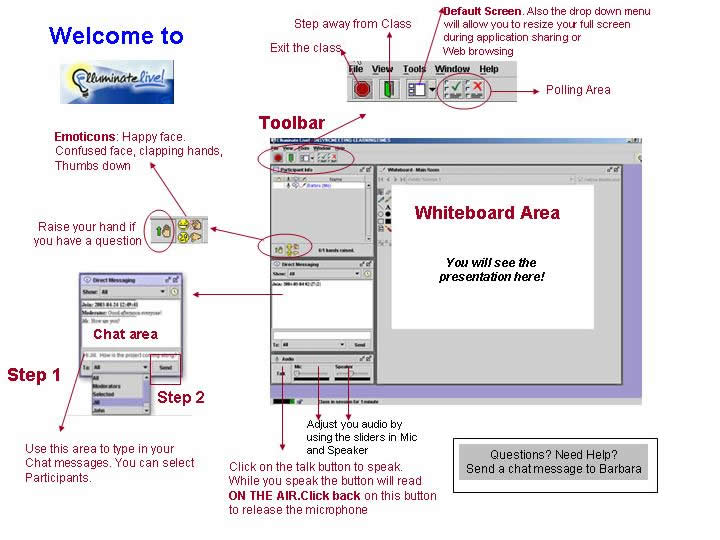
Job Aid
This Job Aid describes some of the most common features of the virtual classroom.